Pile Capacity Calculations
The following examples detail the steps required to run pile capacity
calculations in edafos.
Piles in Sand
Consider the example in Figure 10.
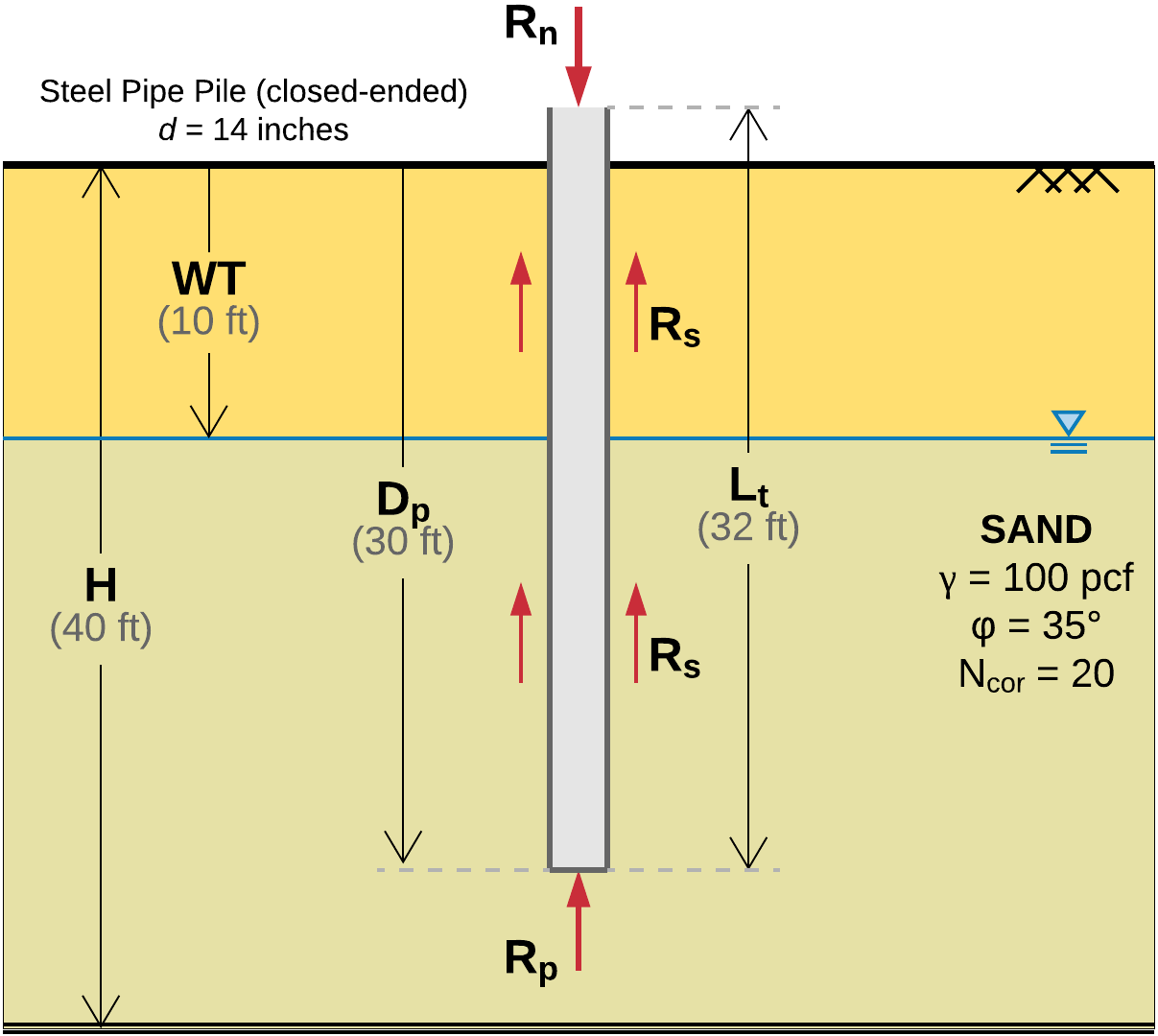
Figure 10 Closed-ended steel pipe pile in sand.
The calculated capacity, \(R_n\), (aka nominal resistance) is the sum of the frictional (aka shaft) resistance, \(R_s\), and the end-bearing (aka toe) resistance, \(R_p\), of the pile. Hence,
\[R_n = R_s + R_p\]
Project setup
In edafos, this example is set up as follows:
# Import the Project, SoilProfile and Pile classes
from edafos.project import Project
from edafos.soil import SoilProfile
from edafos.deepfoundations import Pile

# Create the project object
project = Project(unit_system='English', project_name='Example 1')

# Create a SoilProfile object with initial parameters
profile = SoilProfile(unit_system='English', water_table=10)

# Add layer properties
profile.add_layer(soil_type='cohesionless',
                  height=40,
                  tuw=100,
                  field_phi=35,
                  corr_n=20)

# Attach the soil profile to the project
project.attach_sp(profile)

# Create a pile
pile = Pile(unit_system='English',
            pile_type='pipe-closed',
            length=32,
            pen_depth=30,
            diameter=14,
            thickness=0.75)

# Attach the pile to the project
project.attach_pile(pile)

# Why not get the effective stress at say 15-ft??...
project.sp.calculate_stress(15)
And this is the output:
# Import the Project, SoilProfile and Pile classes
In [1]: from edafos.project import Project

In [2]: from edafos.soil import SoilProfile

In [3]: from edafos.deepfoundations import Pile

# Create the project object
In [4]: project = Project(unit_system='English', project_name='Example 1')

# Create a SoilProfile object with initial parameters
In [5]: profile = SoilProfile(unit_system='English', water_table=10)

# Add layer properties
In [6]: profile.add_layer(soil_type='cohesionless',
   ...:                   height=40,
   ...:                   tuw=100,
   ...:                   field_phi=35,
   ...:                   corr_n=20)
   ...:
Out[6]: <edafos.soil.profile.SoilProfile at 0x10f51b048>

# Attach the soil profile to the project
In [7]: project.attach_sp(profile)
Out[7]: <edafos.project.Project at 0x10f51b240>

# Create a pile
In [8]: pile = Pile(unit_system='English',
   ...:             pile_type='pipe-closed',
   ...:             length=32,
   ...:             pen_depth=30,
   ...:             diameter=14,
   ...:             thickness=0.75)
   ...:

# Attach the pile to the project
In [9]: project.attach_pile(pile)
Out[9]: <edafos.project.Project at 0x10f51b240>

# Why not get the effective stress at say 15-ft??...
In [10]: project.sp.calculate_stress(15)
Out[10]: <Quantity(1.188, 'kip / foot ** 2')>

In [11]: print(project)
Project ID: 22617331
Project Name: Example 1
Datetime: 2018-07-03 12:24:51.750288
Unit System: English
------------
Soil Profile WT: 10.0 foot
Pile Type: pipe-closed